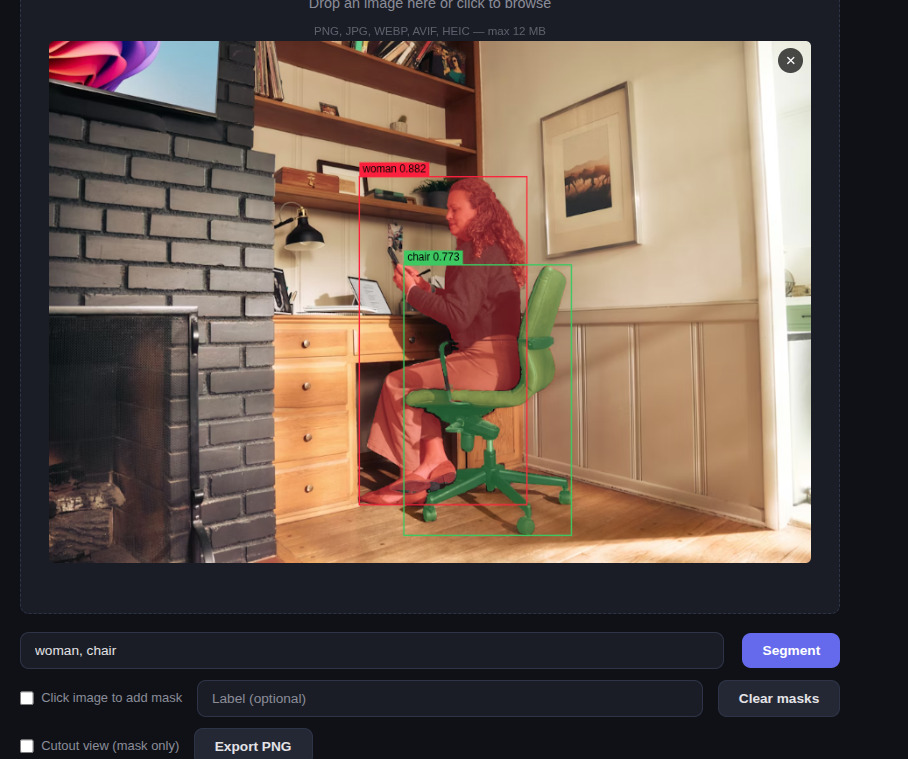
I spent a weekend wiring two open-source vision models together into a tiny web app. You drop in an image, type something like chair, person, lamp, and the page paints a separate translucent mask over each one. Or you flip a toggle and just click any pixel and get the mask for whatever you clicked.
The whole thing is up on GitHub. It’s a single L4 GPU on Modal plus a local FastAPI server. No build step, no framework, just a <canvas> and some opinions.
What I want to talk about here isn’t the wiring — it’s the two models doing the actual work. Because individually they’re both impressive, but the combination of them is one of those rare cases where 1 + 1 quietly turns into 5.
Model one: Grounding DINO, the thing-finder
Grounding DINO is from IDEA Research. It came out in March 2023 and landed at ECCV 2024. It’s a 172M-parameter object detector with one trick that still feels a little magical: you give it a sentence, and it draws boxes around the things in your image that match.
That’s not unusual on its own — open-vocabulary detection had been around for a couple of years by then. What’s different about Grounding DINO is how aggressively it bolts the language side onto the vision side. Most earlier models fused text and image once, right at the end, when they were ready to score boxes. Grounding DINO fuses them in three different places inside the network. The text and the pixels are gossiping at every stage.
The result is a model that, despite never being trained on COCO specifically, scores 52.5 zero-shot AP on it. For context: that beats a lot of models that were trained on COCO. It was trained on around 1.8 million images and 14.7 million annotated instances stitched together from Objects365, OpenImages, RefCOCO, GoldG and a few others.
The catch — and this matters for the next section — is that Grounding DINO only gives you a box. A rectangle. If you want the actual outline of the cat, the curve of the chair leg, the precise edge of the lamp, you need a second tool.
Model two: SAM 2.1, the precise-cutter
Segment Anything Model 2.1 is Meta’s. The original SAM was image-only and came out in 2023; SAM 2 dropped in July 2024 with a single big addition: it works on video too, with the same architecture. The 2.1 checkpoint that I’m using here landed in September 2024.
SAM is “promptable” — you give it a box, or a point, or a rough scribble, and it returns a pixel-perfect mask. The catch is the inverse of Grounding DINO’s: SAM doesn’t speak English. It has no idea what a chair is. You have to point at one for it.
A few things I found surprising once I started reading:
- Its image encoder is called Hiera — a hierarchical Vision Transformer that actually shrinks its token count as the image goes deeper into the network. Most ViTs keep the token count constant the whole way down. Hiera halves it at each stage.
- The video version uses a “memory bank” — a little stash of recent frame embeddings — and conditions each new frame on the previous ones via attention. No optical flow, no explicit motion model, just attention over the past.
- It hits about 44 frames per second on real-time video, 6× faster than SAM 1 on plain images, and Meta benchmarked it as 8.4× faster than humans doing per-frame annotation.
- The dataset they released alongside it — SA-V — has 51,000 videos and 643,000 mask sequences from 47 countries. Largest public video segmentation dataset that exists.
For my purposes it’s the segmentation half of the brain.
The trick is the combination
What Grounding DINO can’t do, SAM can. What SAM can’t do, Grounding DINO can. So you pipe one into the other.
The pattern even has a name. IDEA Research (the Grounding DINO people) put up a repo called Grounded-Segment-Anything literally days after Meta open-sourced the original SAM in April 2023, and later wrote it up as a paper. They called it Grounded SAM. It’s the simplest possible glue: take the boxes Grounding DINO produces from your text prompt, feed each box to SAM as a prompt, get back a mask per box.
That’s it. That’s the trick.
What’s interesting to me about this pattern isn’t that it works — of course it works. It’s that this is one of the first widely adopted demonstrations that the next model doesn’t always need to be a new model. Sometimes it just needs to be a good adapter between two existing ones. The Grounded SAM paper pitched it as “assembling open-world models for diverse visual tasks”, which is academic-speak for: we didn’t train anything, we just plumbed two big models together and the result is more useful than either alone.
This has now seeded a whole sub-genre of tooling — auto-labelers like Roboflow’s Autodistill, the Grounded-SAM-2 video version, medical-imaging forks, robotics perception stacks. All composed, not invented.

Why I bothered
I built this because I wanted to feel how good the two models actually are when you let them work together in the browser, on my own photos, with my own queries. Reading benchmark numbers is one thing. Dropping in a photo of your living room, typing cat, lamp, coffee cup, and watching the right pixels light up in the right colors a few hundred milliseconds later is another.
It also turned out to be a pretty good excuse to learn Modal — the GPU spins up only when someone hits the endpoint, the bill on my account so far is in cents, and I can leave it deployed without thinking about it. The whole stack costs about $0.80/hour while it’s running and zero the other 23 hours of the day. If you’re curious about that side of it, the README in the repo walks through the Modal setup from a fresh account.
The next model doesn’t always need to be a new model. Sometimes it just needs to be a good adapter between two existing ones.
If you want to play with it yourself, clone the repo and follow the readme. Bring your own image. The first request is slow (cold start, ~10 seconds), the rest are fast. Try mug on a kitchen photo and watch it ignore your stove. I promise that’s more fun than it sounds.