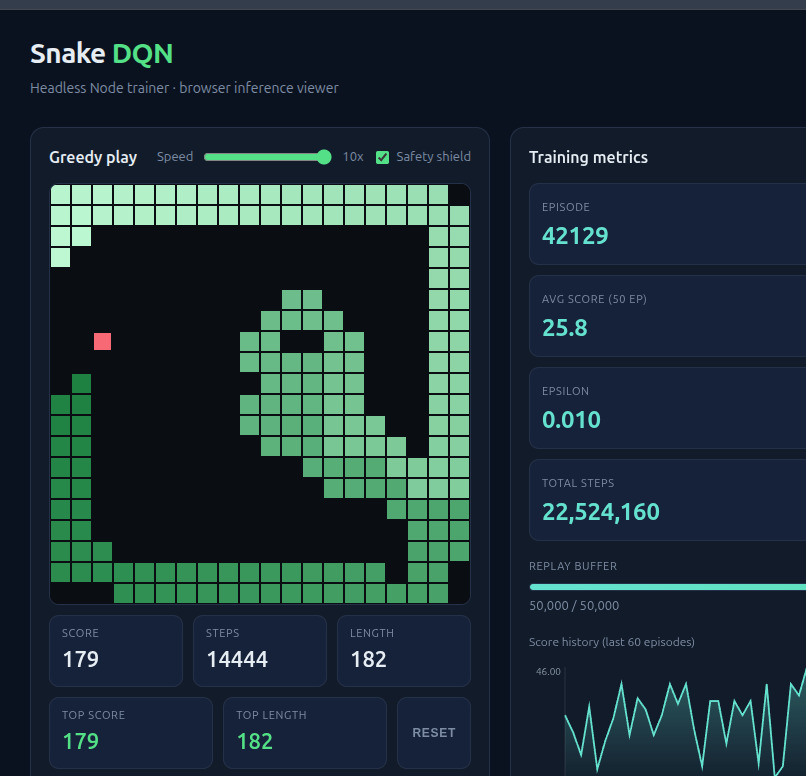
I had a weekend and an itch to watch a neural network learn something in front of me, so I built a thing that teaches itself to play Snake. The whole project is on GitHub. It is a Node trainer that runs the reinforcement learning, and a browser viewer that loads the trained model and draws it playing on a canvas with a little live dashboard next to it.
The part I want to talk about is that all of it is JavaScript. The training, the convolutional network, the replay buffer, the inference in the browser. No Python anywhere. I did this on purpose, partly to see if TensorFlow.js was actually good enough for real RL work and partly because the idea of training in Node and then loading the exact same model in the browser with zero conversion step sounded too clean to pass up.
It mostly was. With one caveat I will get to at the end, because it cost me an evening.
First, what Q-learning even is
Before the Snake stuff, let me explain the idea the whole project rests on, because the rest makes more sense once you have it.
Imagine you are learning a new game and nobody tells you the rules. You just press buttons and once in a while something good happens (you score) or something bad happens (you lose). Over hundreds of tries you start to build a gut feeling: “when the board looks like this and I do that, things tend to go well.” You are not memorizing the game. You are learning, for each situation, which move tends to pay off later.
That gut feeling is exactly what Q-learning tries to capture, just written down as numbers. The “Q” is a score the agent assigns to every possible move in a given situation. A high Q means “I expect this move to lead to good things down the road,” a low Q means “this one tends to end badly.” Faced with a choice, the agent simply picks the move with the highest Q.
The clever and slightly mind-bending part is how those scores get learned. The agent does not need to know the final outcome in advance. After every single move it nudges its scores a little, using a simple idea: the value of the move I just made should roughly equal the reward I just got, plus how good the situation I landed in looks. Each new situation borrows its value from the next one, and the next from the one after that. Do this millions of times and the knowledge of “this leads to death in ten moves” slowly seeps backward until it colors the move that started the trouble. Reward trickles back up the chain of decisions.
Early on the agent has no idea what is good, so it mostly moves at random to explore. As its scores get more trustworthy it leans on them more and explores less. That balance, called exploration versus exploitation, is just the formal version of “try new things while you are still ignorant, trust your judgment once you have some.”
The catch: in a real game there are astronomically many possible situations, so you cannot keep a tidy lookup table of a score for each one. That is where the neural network comes in. Instead of a table, you train a network to look at a situation and guess the scores. Q-learning plus a neural network doing the guessing is called a Deep Q-Network, or DQN. That is the whole acronym, demystified.
What the thing actually does
Snake is a good fit for this. Small board, three real choices at any moment (go straight, turn left, turn right), and a clear feedback signal. You eat food, you get points. You hit a wall or your own tail, you die. Points and death are exactly the “good things” and “bad things” the agent learns to chase and avoid.
Rather than hand the agent a neat summary like “food is two squares to your left,” I gave it something closer to a picture of the board and made it work out the meaning itself. Technically that is a stack of 7 layers: one marking where the body is, one for the head, one for the food, and four more for which direction the snake is currently moving. The point is that the agent sees the raw layout and has to learn what matters on its own. It is the more honest version of the problem, and the harder one.
The network that does the guessing is a convolutional network, which is the same family of network used for recognizing objects in photos. They are good at spotting patterns in space, like “the body is curling around to box in the head,” which is exactly the kind of thing a Snake player needs to notice. It looks at the board and outputs three numbers, the Q-scores for going straight, turning left, and turning right.
I will spare you the full list of dials. The short version: I used a few standard refinements that stop this kind of training from chasing its own tail and going unstable, and I made the agent replay the moments right before each death more often than the rest, since those are the moments with the most to learn from. The rewards are simple: a point for eating, a penalty for dying or starving, a tiny nudge against wasting time, and a small bonus for heading toward the food.
TensorFlow.js held up better than I expected
A quick bit of background for the non-coders. Almost all serious machine learning happens in Python, and TensorFlow.js is the version that runs in JavaScript, the language of web browsers. The common assumption is that it is the toy version, fine for a cute demo but not for real training. That was not my experience.
The training ran fast enough on an ordinary processor to play many games of Snake at once and chew through hundreds of rounds without me getting up to make coffee. Writing it felt familiar and the day-to-day was, if anything, smoother than the Python equivalent.
But the real win is what happens after training. Normally you train a model in one place and then go through a fiddly conversion step to get it running somewhere else, and things can subtly break in the handoff. Here there is no handoff. The trainer saves the finished model to a file, and the web page loads that exact file and plays. Same brain, no translation. For a side project where I just want to watch the thing play in a browser tab, that erased a whole category of busywork.
Where pure learning quietly gave up
Now the part that taught me the most, which had nothing to do with TensorFlow.js and everything to do with the problem itself.
After a lot of training the agent plateaued. Decent scores, but it kept killing itself by curling into its own body. The death breakdown the trainer prints made it obvious:
score mean 28.6 median 30 max 48 min 2 / deaths wall 11% self 90%Ninety percent of deaths were the snake running into itself. It was great at chasing food and terrible at not trapping itself, and piling on more training did not fix it. The reason is baked into how Q-learning works. Trapping yourself is the result of a decision you made dozens of moves earlier, and as good as reward-trickles-backward is, it struggles to connect a death now to the move way back then that doomed you. The lesson arrives too late to stick.
So I stopped trying to teach it and just gave it a rule instead. Right before each move, the agent now does a quick check: after this move, can the head still trace a path to the tail? If a move would wall the snake off from its own tail, it is forbidden. That single rule, bolted on top of the trained network with no retraining, took the average score from about 28 to around 136 and all but eliminated the snake killing itself.
It is a lesson I keep relearning. Not every problem wants to be solved by the model. Some want the model plus a small, dumb, hard rule sitting on top. The network handles the fuzzy “where is the food and roughly how do I get there.” A few lines of plain logic handle “do not box yourself in.” Together they beat either one alone.
The Linux disclaimer, because it cost me an evening
This last section is the technical bit, written for anyone who actually wants to run the project on Linux. If that is not you, the gist is simple: getting the graphics card to help with the training was the one genuinely annoying part, and I had to make the project carry its own setup around so it would work on any machine. You can happily skip to the end.
Here is the bit to save you the pain I went through, and the reason I am pointing you at the package.json.
The trainer wants the GPU, the graphics card, because it can do the heavy math far faster than a regular processor. To get @tensorflow/tfjs-node-gpu to actually use the card on Linux, it needs CUDA 11.8 and cuDNN 8, and it needs to find those shared libraries at runtime. The problem is that a fresh machine, or one with a different CUDA version installed system-wide, will either fail to load the native binding or silently fall back to CPU and leave you wondering why nothing got faster.
The fix I settled on was to stop relying on whatever happens to be installed system-wide and instead vendor the exact NVIDIA libraries the project needs into a local gpu-libs folder, then point the loader at them right before Node starts. That is what the train and eval scripts are doing with that wall of shell at the front:
"train": "LD_LIBRARY_PATH=\"$(echo \"$PWD\"/gpu-libs/nvidia/*/lib | tr ' ' ':'):${LD_LIBRARY_PATH}\" node train/train.js"Unpacking that: it globs every lib directory under gpu-libs/nvidia/*, joins them into a colon-separated list with tr, prepends that to the existing LD_LIBRARY_PATH, and only then runs the trainer. So the project carries its own CUDA runtime around and shoves it to the front of the library search path, which means it does not matter what the host machine has installed. The vendored libs win.
The other half of the fix lives in the pnpm config:
"onlyBuiltDependencies": ["@tensorflow/tfjs-node", "@tensorflow/tfjs-node-gpu"]By default pnpm has gotten cautious about running install scripts for packages, and the TensorFlow Node bindings need their native build step to run or the whole thing is dead on arrival. This line tells pnpm “yes, these two specifically are allowed to build,” so the native addon actually gets compiled and you do not get a cryptic missing-binding error the first time you try to train.
None of this is in the TensorFlow.js getting-started docs, which assume the happy path where CUDA is already set up correctly. On a real Linux box it rarely is. If you clone the repo and the GPU is not kicking in, the answer is almost always one of those two things: the libraries are not on the path, or the native binding never got built.
Worth it
I got what I wanted out of the weekend. I watched a network learn Snake from something close to raw pixels, I found the exact spot where learning stops being the right tool, and I confirmed that you can do honest reinforcement learning in plain JavaScript and load the result straight into a browser tab with nothing lost in between.
If you want to poke at it, clone the repo, run pnpm train, then pnpm serve, and open the viewer to watch it play. Just budget a little time for the GPU setup if you are on Linux. You have been warned.